
Nivalis Nights system requirements
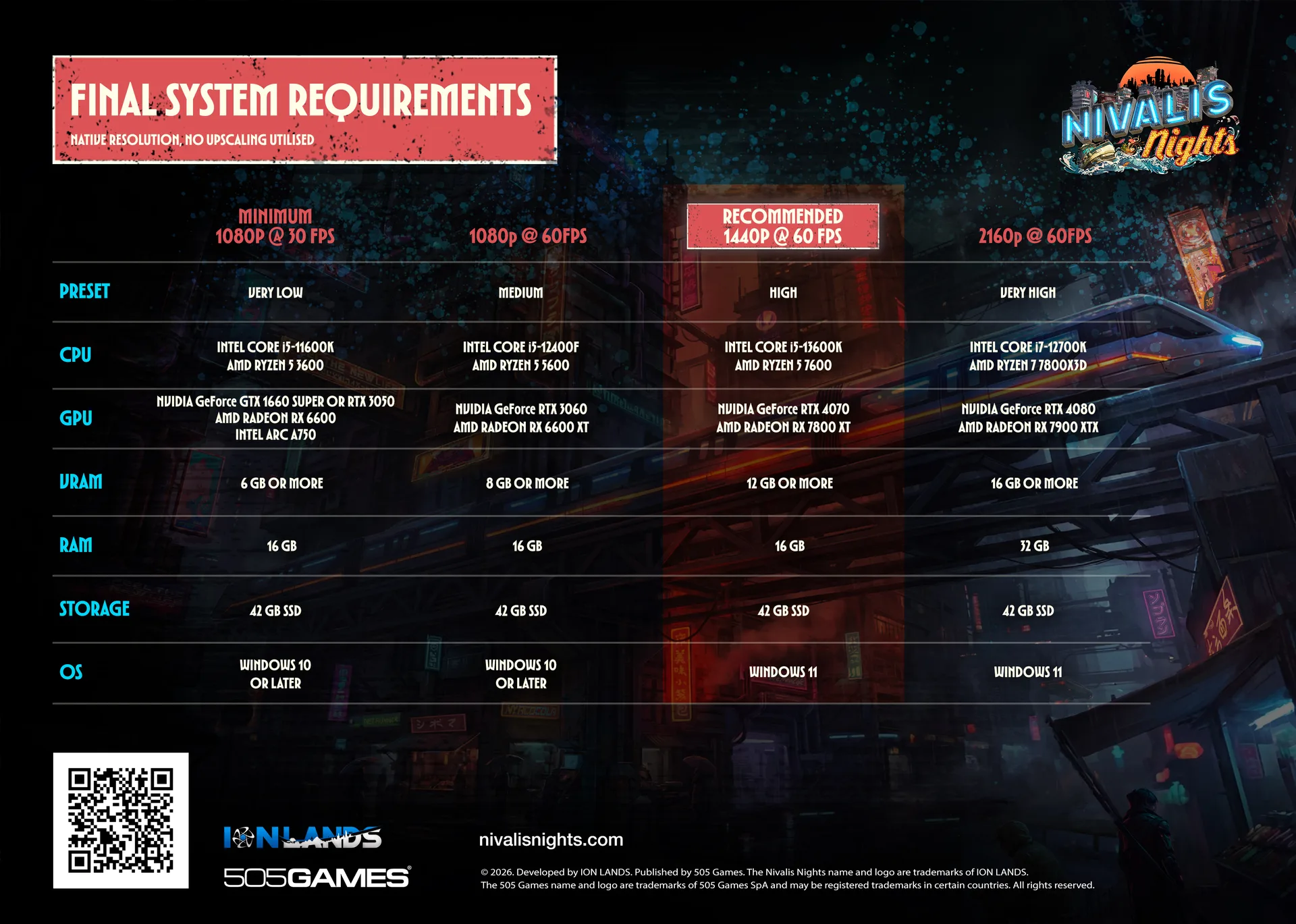
The studio published four PC tiers, not the usual two. The floor is 1080p at 30 fps on the Very Low preset with a NVIDIA GeForce GTX 1660 SUPER or RTX 3050 and 6 GB of graphics memory. Steam’s own “Recommended” is 1440p at 60 fps on High, and that one asks for an NVIDIA GeForce RTX 4070, 12 GB of VRAM and Windows 11. Every tier needs 42 GB on an SSD.
Check your PC against the four tiers
The checker compares your graphics memory, system memory, Windows version and SSD space with each tier. It does not judge how fast your processor or graphics card is, so when it names a tier, compare yours with the ones listed for that tier.
Pick your graphics memory, RAM and Windows version. Until you do, the table below shows all four tiers. Processor and graphics card speed are listed per tier for you to compare; the checker cannot judge them.
| Tier | Target | VRAM | RAM | Windows | Graphics cards named |
|---|---|---|---|---|---|
| Minimum | 1080p / 30 fps | 6 GB+ | 16 GB | Windows 10 or later | NVIDIA GeForce GTX 1660 SUPER or RTX 3050 · AMD Radeon RX 6600 · Intel Arc A750 |
| 1080p at 60 | 1080p / 60 fps | 8 GB+ | 16 GB | Windows 10 or later | NVIDIA GeForce RTX 3060 · AMD Radeon RX 6600 XT |
| Recommended | 1440p / 60 fps | 12 GB+ | 16 GB | Windows 11 | NVIDIA GeForce RTX 4070 · AMD Radeon RX 7800 XT |
| 4K at 60 | 2160p / 60 fps | 16 GB+ | 32 GB | Windows 11 | NVIDIA GeForce RTX 4080 · AMD Radeon RX 7900 XTX |
The full table
All four columns are “native resolution, no upscaling utilised”, so DLSS, FSR or XeSS should buy headroom on top of these numbers. The studio has not said which upscalers the game supports.
| Minimum | 1080p at 60 | Recommended | 4K at 60 | |
|---|---|---|---|---|
| Target | 1080p at 30 fps | 1080p at 60 fps | 1440p at 60 fps | 2160p at 60 fps |
| Preset | Very Low | Medium | High | Very High |
| CPU | Intel Core i5-11600K / AMD Ryzen 5 3600 | Intel Core i5-12400F / AMD Ryzen 5 5600 | Intel Core i5-13600K / AMD Ryzen 5 7600 | Intel Core i7-12700K / AMD Ryzen 7 7800X3D |
| GPU | NVIDIA GeForce GTX 1660 SUPER or RTX 3050 / AMD Radeon RX 6600 / Intel Arc A750 | NVIDIA GeForce RTX 3060 / AMD Radeon RX 6600 XT | NVIDIA GeForce RTX 4070 / AMD Radeon RX 7800 XT | NVIDIA GeForce RTX 4080 / AMD Radeon RX 7900 XTX |
| VRAM | 6 GB or more | 8 GB or more | 12 GB or more | 16 GB or more |
| RAM | 16 GB | 16 GB | 16 GB | 32 GB |
| Storage | 42 GB SSD | 42 GB SSD | 42 GB SSD | 42 GB SSD |
| OS | Windows 10 or later | Windows 10 or later | Windows 11 | Windows 11 |
What Steam adds
The store lists only Minimum and Recommended, and its notes add two things the chart leaves out. Both tiers require a 64-bit processor and operating system and DirectX 11. The notes also give laptop equivalents:
- Minimum: “Laptop equivalent: RTX 4050 Laptop with 6 GB VRAM.”
- Recommended: “Laptop equivalent: RTX 4080 Laptop or RTX 5080 Laptop with 12 GB or more VRAM.”
- And for both: “Mobile GPUs perform below their desktop equivalents.”
Reading the numbers
16 GB of RAM covers three tiers out of four. Only the 4K column asks for 32 GB. With 16 GB, the memory lines that still separate the tiers are graphics memory and, above 1080p, Windows 11.
Windows 10 stops at 1080p. The Minimum and 1080p at 60 columns say “Windows 10 or later”; the two higher columns name Windows 11. The studio has not explained why, or said that the game refuses to start on Windows 10 at higher settings.
An SSD is not optional. Both Steam notes say “SSD required”, and the chart prints 42 GB SSD in every column.
Handhelds that share one pool of memory between processor and graphics have no separate VRAM figure to set against these columns, which is why the Steam Deck page is its own question. Mac and Linux players can read what the studio said about macOS and Linux.